Spotify: Music and Podcasts
- 4.3
- Rating
- 1.00B
- Installs
- Free
- Price

 Analysis by App-foxy
I use Spotify as an everyday music and podcast app, but its real test is not simply whether it can play a song. The more useful question is how comfortably it works when I am tired, distracted, commuting, cooking, driving, or trying to find something without staring at a screen for too long. In that respect, Spotify feels polished and familiar, although it is not equally convenient for every person or every situation.
Developed by Spotify AB, this free Music & Audio app has grown far beyond a basic player. It combines music discovery, personal playlists, podcasts, and listening controls in one place. The service has an average rating of 4.3 from around 35 million ratings, with over 1 billion installs, which matches my impression that it has become a default choice for many listeners. It is rated Teen, and optional purchases range from $5.99 to $400.00 per item, depending on what is offered through the app.
How Spotify feels to use in different situations
When I use Spotify in different settings, I notice that the best experience often comes from deciding what I want before I press play. A little preparation can make a busy app feel much calmer, especially when I’m away from home or occupied with something else. That practical routine also helps explain why its value can change after the first few days.
In-Depth Coverage of Spotify: Music and Podcasts
Readable screens and navigation that usually make sense
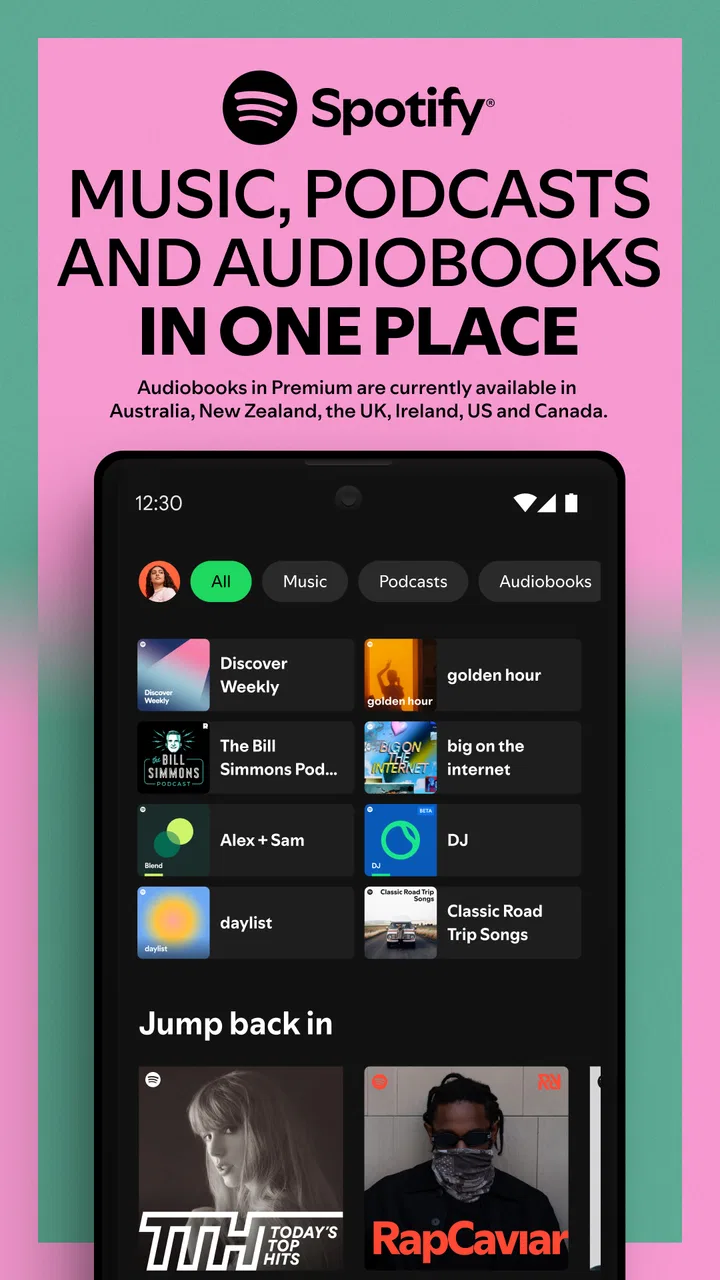
When I open Spotify, the main experience is built around familiar destinations for home recommendations, searching, and personal listening. That structure is easy to understand after a short time. I can move from a suggested album to an artist page, save something for later, or return to a playlist without learning an unusual interface. The app also uses recognizable artwork and clear content groupings, which helps me identify where I am.
The strongest part of the navigation is the search experience. I can search for a song, artist, album, podcast, or playlist without needing to know the exact route through the app. This matters for people who find browsing tiring or who prefer direct instructions rather than exploring several menus. Search is also useful when I remember only part of a title, although the results can become crowded when a popular phrase matches many kinds of content.
Spotify’s recommendations are visually prominent, and that is both helpful and demanding. A listener who wants quick suggestions can start playing something with very little effort. Someone who prefers a calm, predictable interface may find the number of cards, covers, categories, and changing recommendations distracting. I often use search or my own library when I want fewer decisions.
Text readability is generally comfortable on a modern phone, especially for song titles and major controls. However, album artwork carries a lot of visual weight, and some secondary labels are less important on the screen. People who need larger text, stronger contrast, or a very uncluttered layout should check how Spotify responds to their device’s display settings rather than assuming every part of the interface will scale equally well.
A useful habit is to build a small set of dependable playlists instead of relying entirely on the home screen. I keep separate lists for focused work, walking, and familiar evening listening. This reduces the need to interpret recommendations when I am in a hurry. It also makes the app more usable for anyone who has difficulty with dense visual choices or who wants the same listening path each day.
Controls, touch demands, and sensory comfort
Basic playback is straightforward: play, pause, skip, and move through a track are actions most people can understand immediately. The difficulty appears when I try to perform precise actions on a small screen. Selecting a particular point in a song, opening a menu beside a track, or rearranging a playlist may require more accuracy than simply starting playback. Users with limited dexterity may prefer preparing playlists in advance rather than making several small adjustments while listening.
Spotify works best when I separate setup from listening. Before leaving home, I can organize the queue, choose a playlist, and decide whether I want music or a podcast. Once playback begins, I can keep interaction to a minimum. This is more than a convenience: it reduces repeated tapping for people who experience fatigue, tremor, pain, or difficulty maintaining a steady grip.
For listeners sensitive to visual stimulation, the moving artwork, changing recommendations, and busy discovery screens may feel less restful than a simple audio player. The app is designed to encourage exploration, so it naturally presents a lot of material. I find the experience calmer when I open a known playlist directly instead of lingering on the home page.
Audio itself also needs personal judgment. Music and podcasts vary widely in loudness, pace, vocal style, and background texture. A podcast with several speakers or dramatic sound design may be harder to follow than a quiet spoken episode. Spotify gives me access to a huge range of listening choices, but it cannot make every recording equally comfortable for every listener. I usually sample an episode before committing to a long session.
Another practical point is the difference between passive and active listening. A playlist is easy to leave running while I do housework, but podcasts demand more attention if I want to retain details. For someone with auditory processing difficulties, the ability to pause and revisit content is valuable, yet the app still depends on the clarity of the original recording and the listener’s surroundings.
You May Also Like

 AliExpress - Shopping App
AliExpress Makes Global Shopping Feel Personal, but Shoppers Bear the Risk
AliExpress turns a global marketplace into a pocket-sized discovery engine. Its reach is useful, its shopping loop compelling, and its trade-offs easy to miss.

 Lords Mobile: Kingdom Wars
Lords Mobile Is a Kingdom-Building Routine, Not a Quick Match
A case-by-case verdict on the building, battles, device demands, and social commitments that make Lords Mobile rewarding for some players and exhausting for others.

 PDF Scanner app - TapScanner
TapScanner Makes Paperwork Easier to Capture, Check, and Share
TapScanner makes scanning with a phone feel less like a rescue operation and more like a dependable step in getting work done. Its capture tools are useful, though not flawless.

 Block Blast!
Block Blast! Shows How Much a Puzzle Game Can Leave Out
A quiet grid game shows why puzzle players increasingly value instant clarity, repeatable skill and low-pressure play—and where the genre still needs to catch up.

 Family Space
Family Space Review: A Shared Routine That Makes Family Life Easier
A parenting app earns its place not by adding more noise, but by making everyday coordination easier. Family Space gets that balance mostly right.

 1Weather Forecasts & Radar
1Weather Forecasts & Radar Makes the Daily Check Worthwhile
A good forecast does more than predict rain. This week's pick turns changing conditions into a clear, practical reason to check before you step outside.
More From Our News Desk
View All News


What changes when the phone is not the main focus
Spotify is particularly useful in situations where looking at the screen is inconvenient. I use it while preparing food, walking, exercising, or traveling, because I can start a playlist and let the audio continue without constant visual interaction. This is where the app feels more accessible in practice: once the desired content is selected, the phone can become secondary.
Consider a realistic morning routine. I might be getting ready, carrying a bag, and trying to leave on time. Searching for a new album in that moment is frustrating, but opening a familiar playlist is quick. If I prepare that playlist beforehand, Spotify becomes almost invisible, which is exactly what I want. The same approach works for someone who cannot comfortably operate a phone for long periods or who needs to preserve attention for the surrounding environment.
Travel introduces a different trade-off. Streaming is convenient when a connection is reliable, but I do not want an important journey to depend on discovering content at the last minute. I prefer selecting listening material before departure and checking that it is ready for the intended situation. This is also sensible for listeners with limited data, intermittent service, or anxiety about losing access during a trip.
In a car, I treat the app as a preparation tool rather than something to browse while moving. Setting up the queue before driving is safer and easier than searching during the journey. The same principle applies to cycling and walking near traffic: the best interface is the one I no longer need to touch.
Spotify can also support shared listening at home. One person can make a playlist for a gathering, while another can search for a specific artist or podcast. The challenge is that personal recommendations and listening history can make the experience feel individualized rather than neutral. For shared use, I find a clearly named collaborative playlist more practical than handing over the entire account and asking someone to navigate through it.
Where it compares well, and where another option may fit better
Compared with a basic music player, Spotify offers far more discovery. I do not need to own every file or manually organize every album before I can explore something new. That is a major advantage for curious listeners, people who enjoy themed playlists, and anyone who wants music and podcasts in the same app.
Compared with a radio-style service, it gives me more control over what I return to. I can create a listening routine around specific artists, moods, or activities instead of accepting whatever comes next. The cost of that control is choice overload. A simple radio app may be better for someone who wants to press one button and avoid managing a library.
Compared with a locally stored collection, Spotify is more flexible but less independent from the service itself. A personal music library can feel calmer, more predictable, and easier to manage without recommendations. It may also suit listeners who already own carefully organized files and do not need podcasts or discovery. Spotify is the stronger choice when variety matters more than complete control over the collection.
Podcast listeners should consider the same distinction. Spotify is convenient when music and spoken audio belong in one place, but a dedicated podcast app may offer a more focused workflow for someone who listens almost exclusively to episodes. If I mainly want albums and rarely touch podcasts, the combined design can sometimes feel like extra material rather than an advantage.
Remaining barriers I noticed in regular use
The biggest barrier is not the availability of content; it is the amount of choice. Recommendations, playlists, artist pages, podcasts, and menus can make the app feel busy. New users may need time to understand where saved items, queues, and personal playlists fit together. I would not recommend it to someone who wants the fewest possible controls and no discovery layer.
Small-screen precision is another limitation. The app is comfortable for broad actions, but less comfortable when I need to edit, sort, or make several selections quickly. People with motor limitations may find that a prepared routine is much easier than spontaneous playlist management. A larger screen or an alternative input method may improve the experience, but the app itself still asks for occasional precise interaction.
There is also a social and personal barrier in the recommendation system: the more I use the service, the more my listening patterns shape what I see. That can be useful, but it may also narrow my attention around familiar choices. I deliberately search outside the home recommendations when I want to avoid repeating the same styles. Listeners who prefer complete neutrality may feel more comfortable with a manually maintained library.
Age and content context deserve attention too. Spotify carries a Teen content rating, and music or podcast material can vary considerably in language and subject matter. I would not hand the app to a younger listener without considering what they can search for and play. The broad catalog is a strength for adults, but it means families should make their own judgment about suitable use.
The free price makes trying the app easy, but the presence of optional in-app purchases means the experience can include choices beyond simply installing and listening. I recommend checking the plan and payment details carefully before confirming anything. For someone who wants a completely purchase-free environment, that extra decision may be an unnecessary source of friction.
Who I would recommend it to
I would recommend Spotify to people who want one familiar place for music discovery, personal playlists, and podcasts. It is especially good for listeners whose routines change from day to day: a focused playlist in the morning, an artist search during a walk, and a podcast in the evening. The ability to move between these uses without changing apps is its clearest practical strength.
I would also recommend it to someone who has difficulty making decisions in the moment but is willing to prepare a few reliable playlists. That combination works surprisingly well. The app’s large catalog can be overwhelming, yet a small personal system turns it into a predictable audio tool. Naming playlists by activity rather than by vague mood makes them easier to recognize quickly.
I would suggest skipping it, or at least comparing it carefully with a simpler alternative, if you want a quiet interface, a fully local collection, or almost no interaction after installation. It is also not my first choice for someone who primarily needs detailed podcast management and rarely listens to music. In those cases, a focused player may feel less crowded.
My inclusive verdict after living with it
Spotify is not automatically accessible simply because it is popular, but it does offer a workable mix of clear navigation, flexible listening, and hands-off playback. Its best inclusive quality is the way I can prepare content once and then listen with minimal screen use. Its weakest point is the busy, choice-heavy environment that appears when I need to browse, edit, or make precise selections.
My advice is to judge it by your routine rather than by the catalog alone. Start with a few playlists, use search when recommendations feel noisy, and prepare listening before entering situations where touching the phone is difficult. If those habits match your needs, Spotify can become a genuinely comfortable daily companion. If you need maximum simplicity, total control over local files, or a specialized podcast workflow, another option may serve you better.
For me, the balance is positive. I appreciate that Spotify can shift from background music to deliberate discovery without making me install separate apps, and I value the ability to create a listening setup that reduces visual and motor demands. I would not call every screen effortless, but with a little preparation, it supports more contexts and abilities than its short description suggests.
Spotify AB released the app on May 27, 2014, and its long presence is easy to feel in the mature way its core listening flow works. The free entry point, Teen rating, and enormous audience make it approachable, while the optional purchases and busy discovery design call for sensible boundaries. My final view is simple: Spotify is strongest when I shape it around my needs instead of letting the home screen decide everything for me.
FAQs for Spotify: Music and Podcasts
01What features does Spotify offer for free users?
Spotify's free version allows users to explore a vast library of music and podcasts. While free users can listen to playlists, discover new music, and enjoy podcasts, they will encounter ads in between tracks. Additionally, free users have limited skips and cannot download music for offline listening. Despite these restrictions, it offers a solid experience for casual listeners.
02How does Spotify's premium subscription enhance the user experience?
Spotify Premium offers several enhancements over the free version, including ad-free listening, unlimited skips, and the ability to download music for offline use. Premium users also enjoy higher sound quality and can play any track at any time. These features provide a more seamless and customizable listening experience, ideal for frequent users.
03Can I use Spotify on multiple devices simultaneously?
Spotify allows users to download the app on multiple devices and log in with the same account. However, only one device can stream music at a time under a single account. If a user tries to play music on another device simultaneously, the playback will stop on the first device. Spotify Family or Duo plans offer a solution for multiple users in the same household.
04Is Spotify available offline, and how does offline mode work?
Spotify's offline mode is a feature available to Premium subscribers, allowing them to download music and podcasts to their devices. This is particularly useful for listening without an internet connection, such as during travel. Users can download up to 10,000 songs on each of up to five devices. However, the app requires online connectivity at least once every 30 days to verify the subscription.
05How does Spotify's algorithm recommend music and podcasts?
Spotify uses a combination of algorithms and human curation to recommend music and podcasts. It analyzes listening habits, playlists, and liked songs to create personalized playlists like Discover Weekly and Release Radar. The platform also considers trends and user engagement globally. This blend of technology and personalization helps users discover new content that aligns with their tastes.
Pros
- Vast music library with millions of tracks.
- User-friendly interface with easy navigation.
- Offline listening available with Premium.
- Curated playlists for every mood.
- Seamless integration with smart devices.
Cons
- Free version has frequent ads.
- Some features locked behind paywall.
- Limited skips in the free version.
- High data usage on mobile networks.
- Occasional app crashes reported.

Spotify: Music and Podcasts
Gallery